


Eventify Event App for MICE
3.27.00 Reviews
App Specs
- Version
- 3.1.43
- Updated On
- License
- Free
- Downloads
- 10,000+
- Developer
- Teksmobile
- Categories
- Events
- Platform
- Android
Screenshots
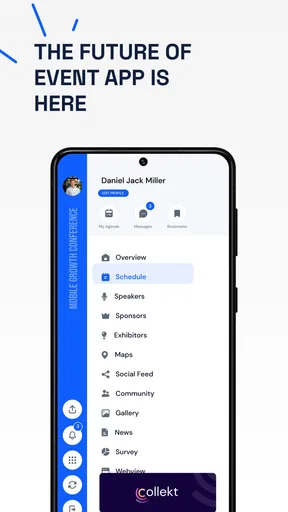
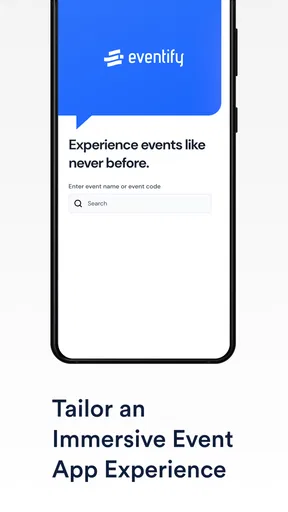
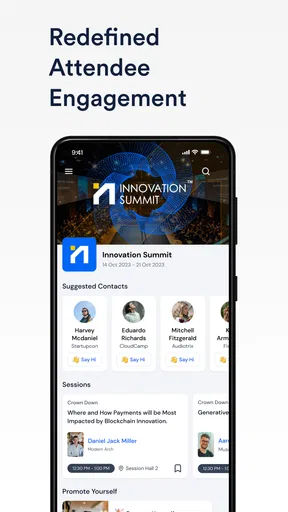
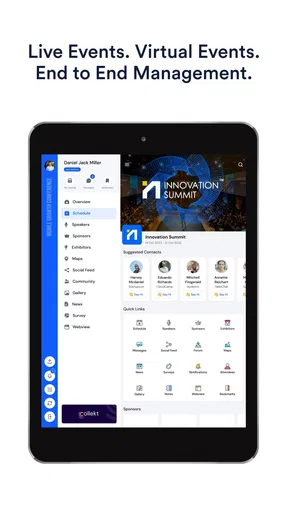
 Analysis by AppCompare
I see Eventify as an event-focused planning app that aims to bring coordination and scheduling into one place. Its appeal is easy to understand: when an event involves more than one person, keeping the time, plans, and conversation straight can become its own job. I like the idea of having a shared place to organize those details, but I’d approach it as a tool to evaluate for your particular group rather than assuming it will replace every calendar or messaging app you already use.
Where event planning can feel easier
The best reason to try an event app is the handoff between deciding something should happen and getting the people involved onto the same page. A calendar is good at showing a date; a group chat is good at quick conversation. Event planning often needs both, plus a way to keep the decision from disappearing under newer messages. That is the problem Eventify is meant to address, and it makes the most sense when you regularly coordinate plans with other people.
For example, imagine arranging a casual weekend gathering with friends. You can start by agreeing on the basic plan, then use one event space to keep the key details visible instead of repeatedly reposting the time and venue in chat. The useful habit is to settle the essentials first and make the event entry the place everyone checks afterward. That reduces confusion without requiring every participant to follow a complicated planning process.
A practical fit for recurring coordination
I would consider it for a volunteer group, a club, a family organizing shared occasions, or a small team arranging informal meetups. These situations usually involve familiar people and a modest number of decisions. A dedicated event tool can be more orderly than a long message thread, especially when participants need to revisit the plan after the initial conversation has moved on.
It is less compelling if your needs are mostly personal time management. If you simply want to remember appointments, your phone’s built-in calendar may already be quicker and more dependable because it is where you look by habit. Likewise, a large conference or a ticketed public event may need specialist registration, attendee management, or on-site tools. I would not assume a general event-planning app covers those more demanding tasks.
What to check before inviting everyone
Before making an event space the group’s source of truth, I’d test the steps that matter most: creating a plan, finding the details again later, and making sure invited people can understand what they need to do. The organizer’s experience is only half the story. If guests find another app inconvenient or are unsure where to respond, the group may drift back to its old chat and the plan becomes split across two places.
A low-stakes first event is a sensible trial. Use it for a simple coffee meet-up or a casual dinner rather than a time-sensitive occasion with many moving parts. You can see whether the workflow feels natural, whether everyone checks the same event details, and whether the app adds clarity instead of another notification stream. That test is more useful than setting up a complicated event before you know how your group will respond.
Worth Reading Before You Choose

EA SPORTS FC Mobile 26 Is a Bigger Football Game, but It Takes Time

Flipboard Shows What News Apps Must Do Beyond the Feed

Switching to Android Auto Means Rethinking Your Driving Routine

Google Calendar Makes a Crowded Week Easier to Manage

Ludo King Makes the Most of the Minutes Between Plans

Baby Panda World Brings Quick Play to Modern Phones, but Its Game Library Feels Busy
How it sits beside calendars and chat
Compared with a standard calendar, an event-planning app is most useful when coordination with other people matters as much as recording a date. Compared with group messaging, its potential advantage is keeping the practical information tied to the plan rather than scattered through conversation. Those are different jobs, so I would not expect one app to make the others unnecessary. A calendar may remain the best personal overview, while chat may still be the easiest place for spontaneous discussion.
The trade-off is that a dedicated tool only earns its place if the group actually uses it. If attendees have to check several apps to find the latest time or location, the extra structure can become friction. I’d choose one clear channel for final details and tell everyone which one it is. That small bit of organizer discipline matters more than adding every available planning option.
There are also practical questions worth answering before relying on any event app for an important plan. Does the way it handles invitations suit people who are not frequent app users? Can your group find the information it needs without the organizer explaining the same thing repeatedly? Does it fit your existing routine, or will you still need to manually keep another calendar current? Try those tasks with a small group first, and you’ll know whether the app fits your real workflow.
Eventify is a free events app from Teksmobile, and it has an average rating of 3.0 from 76 ratings, with 10K+ installs. It is rated for Everyone, was released on March 29, 2019, and its current version is 3.1.38, with Android 7.0 as the minimum operating-system requirement. Those details make it a straightforward option to consider, but they are not a substitute for checking whether its planning approach suits the people you want to invite.
Getting Started with Eventify
First things first, downloading Eventify is a piece of cake. Whether you're on Android or iOS, you can grab it from the respective app stores. Once installed, you're greeted with a sleek and intuitive interface that just screams simplicity. I was up and running within minutes, no tutorials needed!
Features That Stand Out
One of the standout features is its integration capabilities. You can sync Eventify with other calendar apps like Google Calendar, Outlook, and Apple Calendar. This means no more switching between apps to see if you're free. It all comes together in one neat package.
Another cool feature is the customizable event reminders. You can set reminders for any event and choose how you want to be notified. Be it push notifications, emails, or even a text – it’s got you covered. And trust me, these reminders are a lifesaver for someone like me who tends to forget things amidst a busy schedule.
Planning Events Made Easy
Planning an event? Eventify makes it so much easier. You can create an event, invite people directly from your contact list, and even set up polls to decide on the best time that works for everyone. I recently used it to plan a small get-together, and the feedback was overwhelmingly positive. Everyone loved how seamless the experience was.
The app also lets you add notes and attachments to your events. Need to share an agenda or a location map? Just attach it to the event, and everyone invited can access it. It's these little touches that make Eventify feel like a comprehensive tool rather than just another calendar app.
Design and Usability
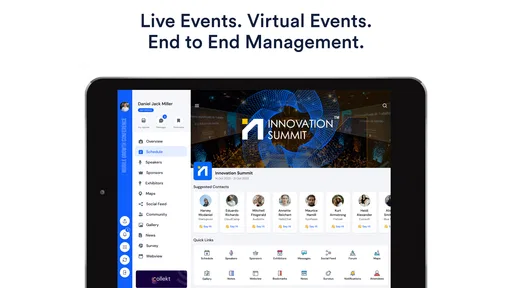
Now, let’s talk about design. Eventify is a visual treat with its clean lines and modern aesthetics. It’s not just about looking good, though. The app is incredibly user-friendly. Navigation is a breeze, and everything is where you’d expect it to be. No hunting around for features or getting lost in menus.
Moreover, the app is lightweight and doesn’t hog your device’s resources, which is always a plus. It runs smoothly without any lag, and transitions between different sections are fluid.
The Social Element
What sets Eventify apart is its social element. There’s an option to connect with friends and see what events they’re attending or planning. It’s a great way to stay in the loop and join in on activities you might otherwise miss. Plus, you can even share events on social media directly from the app.
Final Thoughts
So, is Eventify worth your time? In my opinion, absolutely. It takes the hassle out of event planning and calendar management, wrapping it all up in a user-friendly package. Whether you’re organizing a party or just trying to keep your appointments straight, this app has got your back.
All in all, if you’re looking for a way to simplify your scheduling, give it a shot. It can be a useful choice for people who want a shared place to coordinate plans, provided their group is comfortable using it. I’d start with a simple event, see whether the details stay easy to find, and keep a regular calendar for anything that needs to remain part of your personal schedule.
Pros
- User-friendly interface for easy navigation.
- Customizable event themes and layouts.
- Seamless integration with calendars.
- Real-time notifications and updates.
- Supports multiple languages and currencies.
Cons
- Limited free features in the basic version.
- Occasional sync issues with some calendars.
- In-app purchases can be expensive.
- Customer support response can be slow.
- Some features require stable internet.
FAQs for Eventify Event App for MICE
What is Eventify and what are its main features?
Eventify is a comprehensive event management app designed to streamline the planning and execution of events. Its main features include customizable event templates, attendee management, ticketing options, real-time analytics, and integration with popular calendar apps. It also provides tools for social media promotion and live event updates.
Is Eventify free to use, or are there any subscription fees?
Eventify offers a free version with basic features suitable for small events. However, for larger events or advanced features such as in-depth analytics, custom branding, and priority support, users can opt for a subscription plan. Pricing details are available on their website, with options for monthly or annual billing.
How user-friendly is the Eventify app for beginners?
Eventify is designed with user-friendliness in mind, making it accessible for both beginners and experienced event planners. The intuitive interface, along with step-by-step guides and video tutorials, ensures users can quickly navigate and utilize all features. Additionally, customer support is available to assist with any queries.
Can Eventify integrate with other platforms and tools?
Yes, Eventify integrates seamlessly with various platforms and tools. It supports integration with popular calendar apps like Google Calendar, social media platforms for event promotion, and payment gateways for ticket sales. This integration capability enhances its functionality, providing users with a cohesive event management experience.
How secure is the data stored in Eventify?
Eventify prioritizes user data security with robust encryption protocols and regular security updates. Personal and event data are stored securely, with access limited to authorized personnel only. Users can have peace of mind knowing that their information is protected against unauthorized access and data breaches.


